Transcribed
Course 40 - Web Scraping with Python | Episode 5: From Environment Setup to Pandas DataFrames
Jul 15, 2026 ·
23m 29s
Download and listen anywhere
Download your favorite episodes and enjoy them, wherever you are! Sign up or log in now to access offline listening.
Course 40 - Web Scraping with Python | Episode 5: From Environment Setup to Pandas DataFrames
This automatic transcript is brought to you by
Sounder.AI
This is an automatically generated transcript. Please note that complete accuracy is not guaranteed.
Description
In this lesson, you’ll learn about: setting up a professional Python scraping environment, extracting web data step-by-step, and transforming raw HTML into structured datasets1. Setting Up Your Development Environment🔹 Python...
show more
In this lesson, you’ll learn about: setting up a professional Python scraping environment, extracting web data step-by-step, and transforming raw HTML into structured datasets1. Setting Up Your Development Environment🔹 Python Version ManagementUse pyenv
Clean environment = fewer bugs + reproducible projects🔹 Interactive DevelopmentUse JupyterLab
Locate the exact HTML structure of your target data (e.g., tables, divs)3. Extracting Data with BeautifulSoup🔹 Parsing HTMLUse BeautifulSoupfrom bs4 import BeautifulSoup soup = BeautifulSoup(html, "html.parser") 🔹 Using CSS Selectorstable = soup.select("table.wikitable")[0] rows = table.select("tr") 👉 This allows precise targeting of elements4. Cleaning the Data🔹 Fix Column Names
A successful scraping project is not just about extraction—
it’s about building a clean, repeatable pipeline that turns messy web content into usable data.
You can listen and download our episodes for free on more than 10 different platforms:
https://linktr.ee/cybercode_academy
show less
- Install and switch between Python versions بسهولة
- Avoid compatibility issues across projects
- Create isolated environments
- Manage dependencies like:
- requests
- BeautifulSoup4
- pandas
Clean environment = fewer bugs + reproducible projects🔹 Interactive DevelopmentUse JupyterLab
- Run code in cells step-by-step
- Inspect outputs instantly
- Explore files and HTML visually
- Work offline
- Avoid repeated requests
- Debug faster
- JupyterLab HTML viewer
- Browser DevTools (Elements tab)
Locate the exact HTML structure of your target data (e.g., tables, divs)3. Extracting Data with BeautifulSoup🔹 Parsing HTMLUse BeautifulSoupfrom bs4 import BeautifulSoup soup = BeautifulSoup(html, "html.parser") 🔹 Using CSS Selectorstable = soup.select("table.wikitable")[0] rows = table.select("tr") 👉 This allows precise targeting of elements4. Cleaning the Data🔹 Fix Column Names
- Remove whitespace
- Replace spaces with _
- [1], [citation needed]
- Easy filtering
- Data analysis
- Export to CSV/Excel
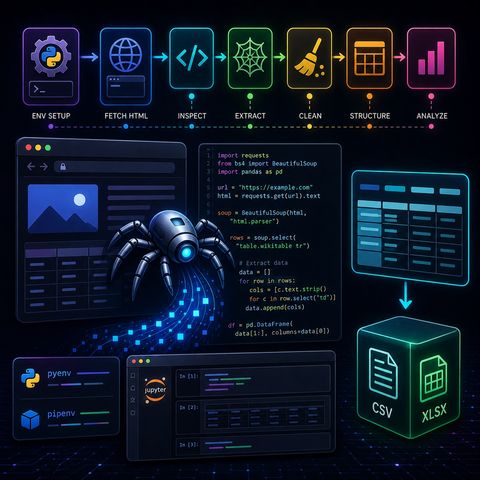
- Setup environment (pyenv + pipenv)
- Fetch HTML (Requests)
- Inspect structure (DevTools / Jupyter)
- Extract data (BeautifulSoup)
- Clean data (Regex + string ops)
- Structure data (lists)
- Analyze (Pandas DataFrame)
A successful scraping project is not just about extraction—
it’s about building a clean, repeatable pipeline that turns messy web content into usable data.
You can listen and download our episodes for free on more than 10 different platforms:
https://linktr.ee/cybercode_academy
Information

Copyright 2026 - Spreaker Inc. an iHeartMedia Company

Comments