Transcribed
Course 40 - Web Scraping with Python | Episode 41: Mastering GET and POST Form Submissions
Aug 21, 2026 ·
11m 31s
Download and listen anywhere
Download your favorite episodes and enjoy them, wherever you are! Sign up or log in now to access offline listening.
Course 40 - Web Scraping with Python | Episode 41: Mastering GET and POST Form Submissions
This automatic transcript is brought to you by
Sounder.AI
This is an automatically generated transcript. Please note that complete accuracy is not guaranteed.
Description
This episode is essentially teaching you how to reverse-engineer web forms into programmatic HTTP requests, which is one of the most important skills in practical scraping.🧭 Core IdeaWeb forms are...
show more
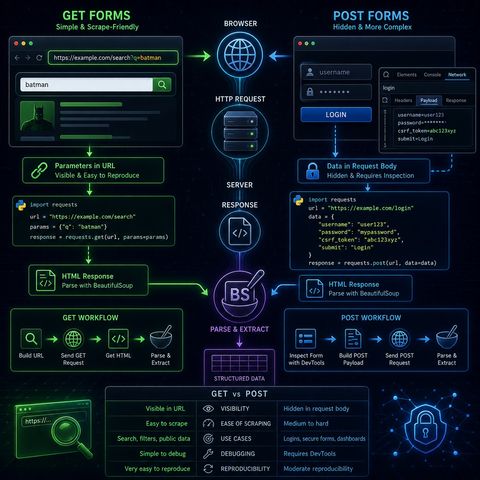
This episode is essentially teaching you how to reverse-engineer web forms into programmatic HTTP requests, which is one of the most important skills in practical scraping.🧭 Core IdeaWeb forms are just structured HTTP requests.So instead of thinking:“I’m filling a form”You should think:“I’m constructing a GET or POST request that mimics what the browser sends”🌐 1. GET Forms (Simple & Scrape-Friendly)🧠 How they work:
You can listen and download our episodes for free on more than 10 different platforms:
https://linktr.ee/cybercode_academy
show less
- User input is appended to the URL
- Parameters are visible in the address bar
- copy the URL directly
- modify query parameters manually
- reproduce requests with requests.get()
- send GET request
- retrieve HTML response
- parse with BeautifulSoup
- data is sent inside the request body
- not visible in the URL
- often used for:
- logins
- government portals
- secure searches
- parameters are hidden
- structure is not obvious from URL
- requires inspecting browser internals
- open Network tab
- submit the form manually
- inspect the request payload
- form fields
- hidden inputs
- request headers
- payload structure
- use BeautifulSoup
- extract structured data
- search engines
- dashboards
- government databases
- login-protected portals (when permitted)
- GET → visible, simple, reusable
- POST → hidden, structured, requires inspection
You can listen and download our episodes for free on more than 10 different platforms:
https://linktr.ee/cybercode_academy
Information

Copyright 2026 - Spreaker Inc. an iHeartMedia Company

Comments