Transcribed
Course 40 - Web Scraping with Python | Episode 35: Locating Dynamic Elements with Selenium and Python
Aug 15, 2026 ·
20m 21s
Download and listen anywhere
Download your favorite episodes and enjoy them, wherever you are! Sign up or log in now to access offline listening.
Course 40 - Web Scraping with Python | Episode 35: Locating Dynamic Elements with Selenium and Python
This automatic transcript is brought to you by
Sounder.AI
This is an automatically generated transcript. Please note that complete accuracy is not guaranteed.
Description
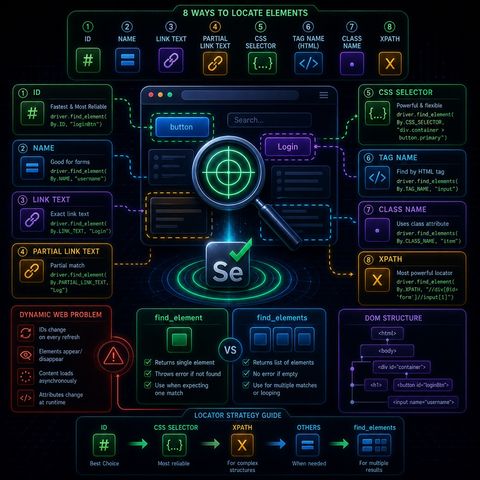
This module is basically about the core skill in Selenium automation: reliably finding the right element on a page that keeps changing.🧩 What “locating elements” really meansIn Selenium, everything you...
show more
This module is basically about the core skill in Selenium automation: reliably finding the right element on a page that keeps changing.🧩 What “locating elements” really meansIn Selenium, everything you interact with is a web element, such as:
You can listen and download our episodes for free on more than 10 different platforms:
https://linktr.ee/cybercode_academy
show less
- buttons
- input fields
- links
- images
- hidden UI components used by JavaScript
- IDs change on every refresh
- classes are generated randomly
- elements appear/disappear after AJAX calls
- regenerate DOM elements constantly
- load content asynchronously
- modify attributes at runtime
- Fastest and most reliable
- Must be unique
- Breaks only if developers change structure
- Works when ID is missing
- Common in forms
- Matches full hyperlink text
- Example: “Login”
- Matches part of a link
- More flexible but less precise
- Very powerful and widely used
- Uses patterns like:
- classes
- hierarchy
- attributes
- Finds elements like , ,
- Usually returns many results
You can listen and download our episodes for free on more than 10 different platforms:
https://linktr.ee/cybercode_academy
Information

Copyright 2026 - Spreaker Inc. an iHeartMedia Company

Comments