Transcribed
Course 40 - Web Scraping with Python | Episode 34: Architecture, Setup, and Basic Web Automation
Aug 14, 2026 ·
19m 50s
Download and listen anywhere
Download your favorite episodes and enjoy them, wherever you are! Sign up or log in now to access offline listening.
Course 40 - Web Scraping with Python | Episode 34: Architecture, Setup, and Basic Web Automation
This automatic transcript is brought to you by
Sounder.AI
This is an automatically generated transcript. Please note that complete accuracy is not guaranteed.
Description
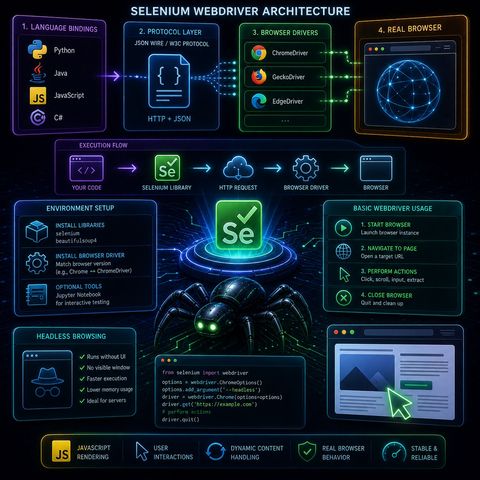
This episode focuses on how Selenium WebDriver actually works under the hood, and then walks into the practical setup and first automation steps.🧠 Selenium WebDriver ArchitectureSelenium WebDriver is designed to...
show more
This episode focuses on how Selenium WebDriver actually works under the hood, and then walks into the practical setup and first automation steps.🧠 Selenium WebDriver ArchitectureSelenium WebDriver is designed to control browsers as realistically as possible, which is why it uses a multi-layer architecture instead of direct code-to-browser control.🧩 1. Language BindingsThese are client libraries that let you write automation scripts in different languages:
You can listen and download our episodes for free on more than 10 different platforms:
https://linktr.ee/cybercode_academy
show less
- Python
- Java
- JavaScript
- C#
- Your script sends HTTP requests
- Commands are encoded as JSON payloads
- These requests are sent to the browser driver
- Chrome → ChromeDriver
- Firefox → GeckoDriver
- receive commands
- translate them into browser-native actions
- opens pages
- clicks elements
- executes JavaScript
- renders content
- Selenium (automation engine)
- BeautifulSoup (optional parsing tool)
- Must match your browser version exactly
- Example: Chrome version ↔ ChromeDriver version
- Jupyter Notebook for interactive testing
- Useful for debugging selectors step-by-step
- Launch Chrome/Firefox via WebDriver
- Open a URL like a normal user
- click
- scroll
- input text
- extract elements
- clean shutdown of session
- Browser runs without UI
- No visible window opens
- faster execution
- lower memory usage
- ideal for servers and automation pipelines
- JavaScript-rendered content
- user interactions
- dynamic page updates
You can listen and download our episodes for free on more than 10 different platforms:
https://linktr.ee/cybercode_academy
Information

Copyright 2026 - Spreaker Inc. an iHeartMedia Company

Comments