Transcribed
Course 40 - Web Scraping with Python | Episode 32: Native Data Storage and Implementation
Aug 12, 2026 ·
17m 6s
Download and listen anywhere
Download your favorite episodes and enjoy them, wherever you are! Sign up or log in now to access offline listening.
Course 40 - Web Scraping with Python | Episode 32: Native Data Storage and Implementation
This automatic transcript is brought to you by
Sounder.AI
This is an automatically generated transcript. Please note that complete accuracy is not guaranteed.
Description
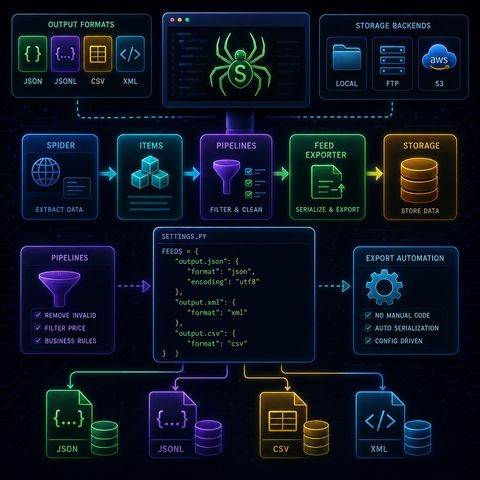
This episode is about removing custom storage code from your Scrapy project and replacing it with Scrapy’s built-in Feed Export system, which turns scraping into a fully configurable data export...
show more
This episode is about removing custom storage code from your Scrapy project and replacing it with Scrapy’s built-in Feed Export system, which turns scraping into a fully configurable data export pipeline.📤 Scrapy Feed Exporters (Automated Data Storage)🧠 Core IdeaInstead of manually writing data to files or databases, Scrapy can automatically export scraped items using:Feed Exporters = built-in serialization + storage systemThey handle:
You can listen and download our episodes for free on more than 10 different platforms:
https://linktr.ee/cybercode_academy
show less
- formatting
- writing
- destination management
- JSON → full structured export
- JSON Lines (JSONL) → streaming-friendly format
- CSV → spreadsheet-ready format
- XML → hierarchical structured output
- JSON → APIs & apps
- CSV → Excel / analytics
- XML → structured integrations
- JSONL → big data pipelines
- 💻 Local filesystem
- 📡 FTP servers
- ☁️ Amazon S3 (cloud storage)
- remove unwanted items
- enforce business rules
- clean or block data
- drop books above a certain price
- filter invalid entries
- take final cleaned items
- serialize them
- write them to destination
- output format
- output destination (URI)
- export behavior
- JSON output
- XML output
- structured datasets
- what to extract (spider)
- what to keep (pipelines)
- where to store it (feed exporters)
You can listen and download our episodes for free on more than 10 different platforms:
https://linktr.ee/cybercode_academy
Information

Copyright 2026 - Spreaker Inc. an iHeartMedia Company

Comments