Transcribed
Course 40 - Web Scraping with Python | Episode 15: Mastering Items, Loaders, and Processing Pipelines
Jul 25, 2026 ·
24m 36s
Download and listen anywhere
Download your favorite episodes and enjoy them, wherever you are! Sign up or log in now to access offline listening.
Course 40 - Web Scraping with Python | Episode 15: Mastering Items, Loaders, and Processing Pipelines
This automatic transcript is brought to you by
Sounder.AI
This is an automatically generated transcript. Please note that complete accuracy is not guaranteed.
Description
In this lesson, you’ll learn about: how Scrapy structures scraped data using Items, how Item Loaders simplify extraction and cleaning, and how Pipelines transform raw scraped output into usable datasets1....
show more
In this lesson, you’ll learn about: how Scrapy structures scraped data using Items, how Item Loaders simplify extraction and cleaning, and how Pipelines transform raw scraped output into usable datasets1. Scrapy Items (Structured Data Containers)🔹 What Are Items?Scrapy Items are structured containers for scraped data.Think of them as:a strongly-typed dictionary for scraped content🔹 Example Structureclass StockItem(scrapy.Item): name = scrapy.Field() symbol = scrapy.Field() price = scrapy.Field() 👉 Key Insight
Items force structure into messy web data2. Using Items in Scrapy Shell🔹 Manual Assignment FlowYou can:
Scrapy Shell helps you validate structure before automation3. Project-Based Item Integration🔹 Moving into Real SpidersItems are defined in:items.py Then used inside spiders:yield StockItem( name=name, symbol=symbol, price=price ) 👉 Key Insight
Items enforce consistency across your whole scraping system4. Exporting Data (CSV / JSON)🔹 Built-in Export Systemscrapy crawl stocks -o data.csv 🔹 Output Formats
Scrapy can export structured data without extra libraries5. Item Loaders (Automation Layer)🔹 Why They ExistItem Loaders reduce repetitive code and handle transformation automatically.🔹 Example Usageloader.add_xpath("price", "//span/text()") 6. Input & Output Processors🔹 MapCompose (Input Cleaning)from scrapy.loader.processors import MapCompose Used to:
Processors turn raw extraction into clean structured data automatically7. Pipelines (Post-Processing System)🔹 What Happens After ScrapingPipelines run after data extraction🔹 Example Pipelineclass PriceFilterPipeline: def process_item(self, item, spider): if float(item["price"]) > 100: item["high_value"] = True return item 👉 Key Insight
Pipelines are where business logic lives8. Enabling PipelinesIn settings.py:ITEM_PIPELINES = { "myproject.pipelines.PriceFilterPipeline": 300, } Lower number = higher priority9. Full Data Flow Model
👉 and start engineering data systems
You can listen and download our episodes for free on more than 10 different platforms:
https://linktr.ee/cybercode_academy
show less
Items force structure into messy web data2. Using Items in Scrapy Shell🔹 Manual Assignment FlowYou can:
- Test XPath selectors
- Extract values manually
- Assign them into Items
Scrapy Shell helps you validate structure before automation3. Project-Based Item Integration🔹 Moving into Real SpidersItems are defined in:items.py Then used inside spiders:yield StockItem( name=name, symbol=symbol, price=price ) 👉 Key Insight
Items enforce consistency across your whole scraping system4. Exporting Data (CSV / JSON)🔹 Built-in Export Systemscrapy crawl stocks -o data.csv 🔹 Output Formats
- CSV → analytics
- JSON → APIs
- XML → legacy systems
Scrapy can export structured data without extra libraries5. Item Loaders (Automation Layer)🔹 Why They ExistItem Loaders reduce repetitive code and handle transformation automatically.🔹 Example Usageloader.add_xpath("price", "//span/text()") 6. Input & Output Processors🔹 MapCompose (Input Cleaning)from scrapy.loader.processors import MapCompose Used to:
- Clean URLs
- Format strings
- Convert data types
- Convert lists → single values
Processors turn raw extraction into clean structured data automatically7. Pipelines (Post-Processing System)🔹 What Happens After ScrapingPipelines run after data extraction🔹 Example Pipelineclass PriceFilterPipeline: def process_item(self, item, spider): if float(item["price"]) > 100: item["high_value"] = True return item 👉 Key Insight
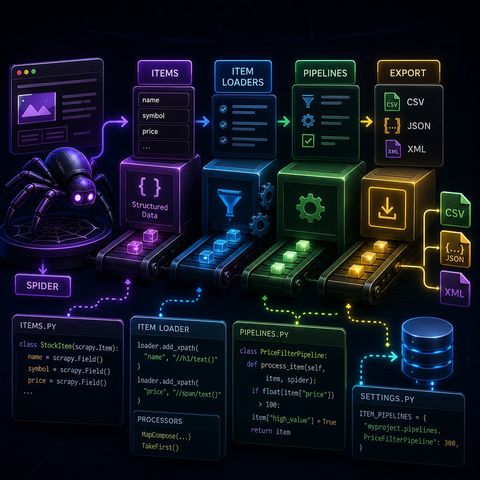
Pipelines are where business logic lives8. Enabling PipelinesIn settings.py:ITEM_PIPELINES = { "myproject.pipelines.PriceFilterPipeline": 300, } Lower number = higher priority9. Full Data Flow Model
- Spider extracts data
- Items structure it
- Item Loaders clean it
- Pipelines transform it
- Export stores it
- 🕷️ Spider → collector
- 📦 Items → containers
- 🧼 Loaders → cleaning station
- 🏭 Pipelines → production line
👉 and start engineering data systems
You can listen and download our episodes for free on more than 10 different platforms:
https://linktr.ee/cybercode_academy
Information

Copyright 2026 - Spreaker Inc. an iHeartMedia Company

Comments