Transcribed
Course 33 - Static Analysis for Reverse Engineering | Episode 3: Graphical Reverse Engineering with x64dbg
May 15, 2026 ·
19m 11s
Download and listen anywhere
Download your favorite episodes and enjoy them, wherever you are! Sign up or log in now to access offline listening.
Course 33 - Static Analysis for Reverse Engineering | Episode 3: Graphical Reverse Engineering with x64dbg
This automatic transcript is brought to you by
Sounder.AI
This is an automatically generated transcript. Please note that complete accuracy is not guaranteed.
Description
In this lesson, you’ll learn about: graphical static analysis and Control Flow Graphs (CFGs)Review AnswerWhen analyzing a Control Flow Graph (CFG) in x64dbg with the xAnalyzer plugin:🔹 What Green and...
show more
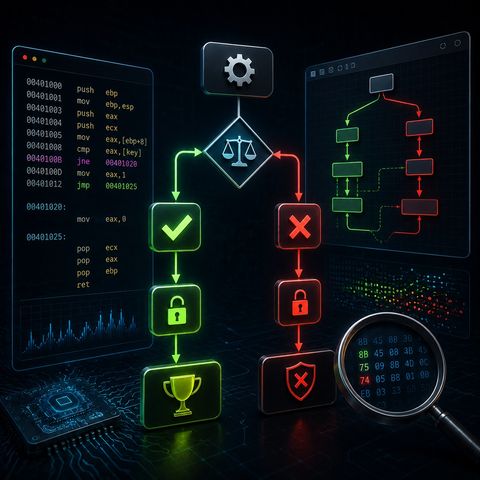
In this lesson, you’ll learn about: graphical static analysis and Control Flow Graphs (CFGs)Review AnswerWhen analyzing a Control Flow Graph (CFG) in x64dbg with the xAnalyzer plugin:🔹 What Green and Red Arrows Represent
You can listen and download our episodes for free on more than 10 different platforms:
https://linktr.ee/cybercode_academy
show less
- Green arrows
- Represent the successful condition (TRUE branch)
- The path taken when a comparison or condition is met
- Red arrows
- Represent the failed condition (FALSE branch)
- The path taken when the condition is not met
- The program evaluates a condition (e.g., JE, JNE, JG, etc.)
- The CFG visually splits into:
- ✅ Green path → correct condition
- ❌ Red path → incorrect condition
- Quickly identify:
- Which branch leads to:
- “Access Granted”
- “Access Denied”
- Which branch leads to:
- Focus on:
- The green path to understand:
- What makes the input valid
- The green path to understand:
- Or manipulate:
- The execution flow (e.g., forcing a jump)
- If key is correct:
- → Program follows green arrow
- → Shows success message
- If key is wrong:
- → Program follows red arrow
- → Shows error message
- Green = “This condition passed”
- Red = “This condition failed”
- Track logic
- Identify validation points
- Reverse engineer faster and smarter
You can listen and download our episodes for free on more than 10 different platforms:
https://linktr.ee/cybercode_academy
Information

Copyright 2026 - Spreaker Inc. an iHeartMedia Company

Comments